Browser uploads can appear in Play now. Add your email to keep your library and connect destination accounts.
ONE LIBRARY. MORE PLACES TO PLAY.
Your game. Everywhere it can go.
Upload once. Distribute through your own accounts with our agent. Reuse saved logins, connect your email and track what each destination actually receives.
Built for independent games. Open to possibility.
START YOUR DISTRIBUTIONLocal preview
Drop a build. Open a world.
No password or separate signup. Your email keeps your library yours.
Share up to 3 browser builds, 50 MB each, kept for 7 days. Or use your email below.
OPTIONAL / YOUR AGENT. YOUR ACCOUNTS.
A world of destinations.
BUILT AROUND DISTRIBUTION
Less repeat work. More reach.
One source library. NextGenRunGames handles supported automatic routes.
01 / UPLOAD
Keep your builds together.
Upload through this page or let your code agent import your whole library. Email-link access keeps signup simple.
02 / CONNECT
Your accounts, less repeat work.
Save or import existing logins and connect verification email once. The account pilot prepares missing GitHub and itch.io accounts and pauses for steps that need you.
03 / DISTRIBUTE
See what actually happened.
Track upload, submission, review and public release separately. Continue work across platforms when one needs attention.
Play.
Loading games…
Desktop is selected. Each game shows whether touch controls are available.
No games match just yet.
Try another search or device.
HTML5
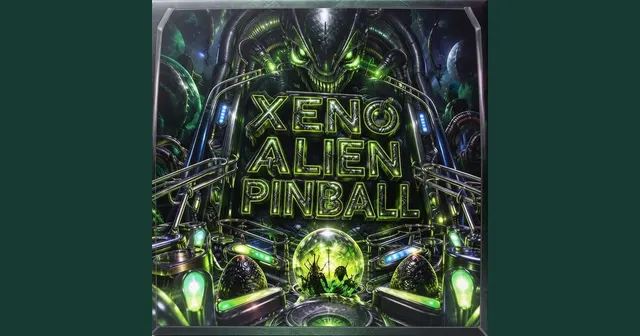
xeno alien pinball
v1.0.0 · Moxazza
About this game
Play pinball like it was a revised version of the old
classic Space Cadet that came with every windows pc.
By Moxazza
pinball/arcade
How to play
hold down enter to make the plunge load up.
press A for left flipper and D for the right one.
PLAYER COMMUNITY
How was the game?
Rate this game.
6 plays
One vote per visitor and game.
Comments
PASS IT ON
A game worth sharing.
Send the play page to a friend, or put the player on your own website.
FROM THE CREATOR’S BUILD
Games run in an isolated player. Some Flash games may need a newer browser export. Desktop and Android downloads need a browser version to join Play.
YOUR PRIVATE WORKSPACE
Game library
Open your workspace with an email link.
Distribution activity
Live links appear after verified publication.
A GROWING CONNECTOR DIRECTORY
Choose your next destination.
Loading automatic upload routes…
ONE DISTRIBUTION BUTTON
Save accounts once, then choose Distribute everywhere on a game. Supported uploads run through the website agent; portal steps and reviews remain visible.
Bringing a Flash game? Keep the original SWF. A tested Ruffle wrapper can provide a separate HTML5 build for suitable distributors. Compatibility still depends on the game and destination.
REACH PLAYERS
Social publishing
Bluesky and Mastodon, together. Queue public playable links and let your connected agent publish them.
PRIVATE DISTRIBUTION WORKSPACE
Opportunity CRM
Track every game and destination, from first research through live placement.
◆Your CRM, contacts and interaction notes stay inside this verified workspace.
Game & destination
Pipeline stage
Contact
Next action
Updated
Open your verified workspace to see your private opportunities.
LEGACY DISTRIBUTION TRACKER
Past platform activity
Import your existing tracker JSON into this private workspace. Opportunity and publication history stays as a dated archive.
No tracker history imported yet.
Date
Record
Game
Destination
Status
SET UP ONCE. RUN FROM HERE.
Your accounts. One distribution button.
Save or import platform logins, connect a verification mailbox and run supported uploads inside this website.
Advanced: connect your own MCP agent or password manager
01 / MCP CONNECTION
Connect your code agent
Open your workspace, create a scoped token, then add this server to your agent’s MCP configuration.
02 / ACCOUNT REFERENCES
Your accounts, your agent
Save the project for this game and a local credential reference. The bridge resolves selected Bitwarden logins, Secrets Manager references or environment keys on your machine. Google routes also accept gcp:adc for local Google credentials.
03 / AUTOMATIC WORKER
Keep uploads moving.
With your private gateway token and destination credentials configured on your machine, run:
npm run worker
Choose automatic distribution when uploading, or queue connected destinations in Library. The worker checks every 30 seconds, continues other jobs after a failure and pauses jobs that need attention.
Keep it running to send new jobs. Hosting previews and store drafts are separate from public release.
04 / VERIFICATION
Email and CAPTCHA support
Choose Gmail, TLS IMAP/SMTP or an existing AgentMail inbox in the setup above. Your agent can read verification mail and save generated signup logins. Private credentials stay on your machine.


 nextgenrungames
Comments